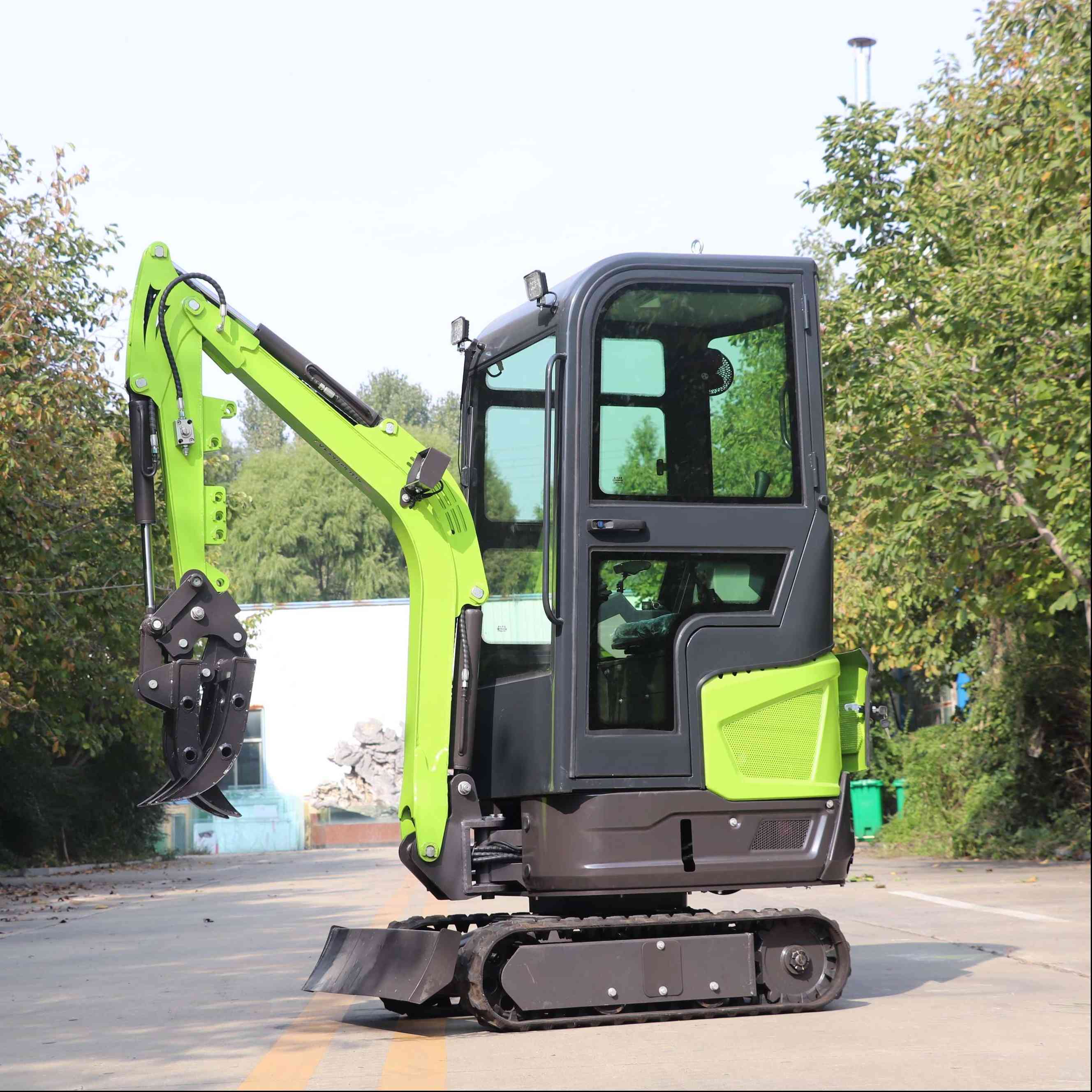
If you've ever spent time on a jobsite, you know sub compact excavators are the unsung heroes of small-scale projects-from backyard landscaping to tight residential digs. But here's the thing: a machine that runs like a dream for one operator might feel clunky and unresponsive for another, and 9 times out of 10, that's not a flaw in the equipment-it's a calibration issue. As a sub compact excavator supplier, I've fielded dozens of calls from folks confused why their machine feels off, and more often than not, the fix is simple, hands-on calibration. Let's walk through how to get your controls dialed in, no fancy tech degree required.
First, let's get on the same page about what we're talking about here. Sub compact excavators are the smallest of the mini excavator lineup-light, maneuverable, built for spaces so tight a full-sized machine can't fit. We're not talking about big 10-ton rigs with joysticks that have a ton of travel; these machines, like our Sub Compact Excavator, rely on precise control to lift small loads, dig narrow trenches, and work around existing structures. Mess up the calibration, and you might dig too deep on a flower bed, or drop a 50-pound paver because the stick didn't retract fast enough. That's why calibration matters more here than on bigger equipment.
Let's start with the basics you need before you even touch the controls. You don't need a toolbox full of fancy gear, but a few standard things will make this way easier: a Phillips-head screwdriver, a small adjustable wrench, a level (the bubble kind, not the digital one-faster for quick checks), and, if your machine has it, a service manual (pro tip: most of ours link to digital copies right on our product pages, so you don't have to hunt for a physical copy). Also, make sure the machine is on flat, solid ground-no sloped driveways or soft grass, because that'll throw your level readings off. Turn the engine off, set the parking brake, and lower all arms to the ground so there's no weight on the hydraulic lines. If you skip this step, your calibration will be wrong, and you'll be back tweaking controls a week later.
Now, let's break down the two main control systems you'll calibrate: the hydraulic joysticks and the arm/boom/bucket proportional settings. For sub compact excavators, most modern models use either proportional electronic controls or mechanical linkages. Our Powerful Performanc Mini Excavator series, for example, has electronic controls that are easy to adjust without removing panels, while older mechanical models might need a bit more wrench work. Let's cover both, starting with electronic since that's what most folks encounter these days.
First step for electronic control calibration: power up the machine (but don't rev the engine too high-idle is fine). Most sub compact excavators have a hidden calibration menu that you access by holding two buttons on the joystick while turning the key to the "on" position. I know, it sounds like a secret code, but every brand has a version-on our machines, it's holding the left joystick forward and right joystick back at the same time for 3 seconds while turning the key. The dash will flash a little light to confirm you're in calibration mode. That's your green light.
Next, you'll follow the on-screen prompts (or the ones in your service manual) to center the joysticks. Here's where I see a lot of new operators mess up: they don't move the joysticks fully to each side before centering. The machine needs to know the full range of motion, so push the left joystick all the way left, hold it for 2 seconds, then bring it dead center. Do the same for right. Then front and back for both joysticks-left joystick forward, hold, center; left back, hold, center; repeat for the right. Once that's done, you'll calibrate the proportional sensitivity. This is the part that lets you tweak how far you push the joystick to get full power. For folks who do precision work-like digging a narrow trench for a backyard water line (that's where our Narrow Mini Digger shines)-you'll want lower sensitivity, so a small joystick movement = small movement of the bucket. For heavier work, like lifting a pile of dirt, you can bump sensitivity up. On our sub compact models, there's a dial on the dash for this, so you can adjust it without re-entering calibration mode. I usually tell new users to start on medium, then tweak based on their go-to jobs.
If you've got a mechanical linkage system (older sub compact excavators, some budget models), the process is a little different, but still doable at your shop or jobsite. First, locate the control levers near the operator seat-usually they're connected to the hydraulic valves with metal rods and clamps. You'll want to check for slack first: wiggle the joystick gently; if it moves more than an inch before the valve does, you've got play that needs adjusting. Grab your adjustable wrench and loosen the lock nut on the rod, then adjust the length until the joystick moves just a quarter-inch before the valve engages. Then, to center the controls, make sure your boom, arm, and bucket are all resting flat on the ground. Push each joystick to its midpoint, then tighten the lock nut. Test it out: if when you push the left joystick forward, the boom lifts smoothly, not jolting, you're good. If it jerks, the linkage is too tight, loosen the nut a hair and try again.
Wait, there's one more calibration step a lot of people forget: the work mode setting. Sub compact excavators usually have 2-3 modes: work, economy, and high-power. Work mode is the default, but if you're running on a small residential lot with thin soil, economy mode will save fuel and make controls more responsive for light digging. If you're moving heavy materials, high-power mode gives you more force, though it uses a bit more gas. Our One Ton Excavator has three easy-to-toggle modes, and I always suggest matching the mode to the job before calibrating controls-you don't want to calibrate for economy mode if you're going to switch to high-power mid-day.
Now, let's talk about common mistakes that mess up calibration, especially with sub compact models. First, not doing the calibration on level ground. If your machine is sitting on a 5-degree slope, the level will read off, and the joystick center will be wrong. I've had operators call me panicking because their excavator kept digging sideways, and it turned out they did the calibration on their sloped driveway. Second, rushing the centering step. A lot of people hit "center" as soon as the joystick is close, not dead on. Most machines will give you an error if it's not perfectly centered, so take 2 extra seconds to line it up. Third, not testing after calibration. Don't just follow the steps and walk away-test each function: lift the boom, curl the bucket, swing the house (the part with the cab) left and right. If the bucket curls when you didn't push the joystick, you're off by a hair, go back and recenter.
Here's a quick example to make this real: last month, a customer from Ohio called me saying their sub compact excavator felt "like it had a mind of its own" when digging a trench for a new patio. He'd calibrated it once, but after a week of moving dirt, the joystick felt loose, and the bucket was digging 2 inches too wide every time. Turns out, the linkage clamp had vibrated loose during transport to his house-super common with smaller machines, since vibration is more noticeable on lighter frames. We walked him through checking the clamp, tightening it, and recentering the joysticks, and he said it was like a new machine after that. That's the thing about sub compact excavators: they're tough, but their controls are delicate, so small tweaks go a long way.
If you're in the market for a machine that's easy to calibrate right out of the box, or you want a model built for specific jobs like household landscaping, check out our Household Mini Excavator line. We design all our machines with operator calibration in mind, so the menus are intuitive, and mechanical linkages are accessible for quick on-site adjustments.
At the end of the day, calibrating your sub compact excavator controls isn't about being a machine repair expert-it's about making your machine work for you, not the other way around. Whether you're a seasoned contractor or a homeowner tackling your first backyard project, taking 15 minutes to dial in the controls will save you time, frustration, and even money on repairs down the line. If you have questions about calibrating our models, or you're ready to get a machine that fits your needs, reach out to our team to connect for purchasing and support. We're here to help make sure your excavator works exactly how you want it to.


References:
- International Standard ISO 10957:2019, Earth-moving machinery - Mini-excavators - Safety
- Operator's Manual for Sub Compact Excavators, American Construction Equipment, 2024
- Hydraulic Control Calibration Guidelines for Small Construction Equipment, National Association of Landscape Professionals, 2023